Why are my iMessages sending as green text messages?
A green bubble means your iPhone sent the message as SMS, MMS or RCS instead of iMessage. Learn the common causes and how to get blue bubbles back.

The short answer
Your messages are sending as green texts because they are being sent as standard SMS or MMS messages, not as iMessages. This can happen if the recipient doesn't have an Apple device, if iMessage is turned off on either phone, or if there's a poor internet connection.
Key takeaways
- Green bubbles mean the message went as SMS, MMS or RCS. Blue bubbles mean iMessage.
- The most common reason is that the other person doesn't use an Apple device.
- iMessage needs Wi-Fi or mobile data, so a weak connection can turn a message green.
- One non-Apple person in a group chat turns the whole chat green.
- Check that iMessage is turned on in your iPhone's Messages settings.
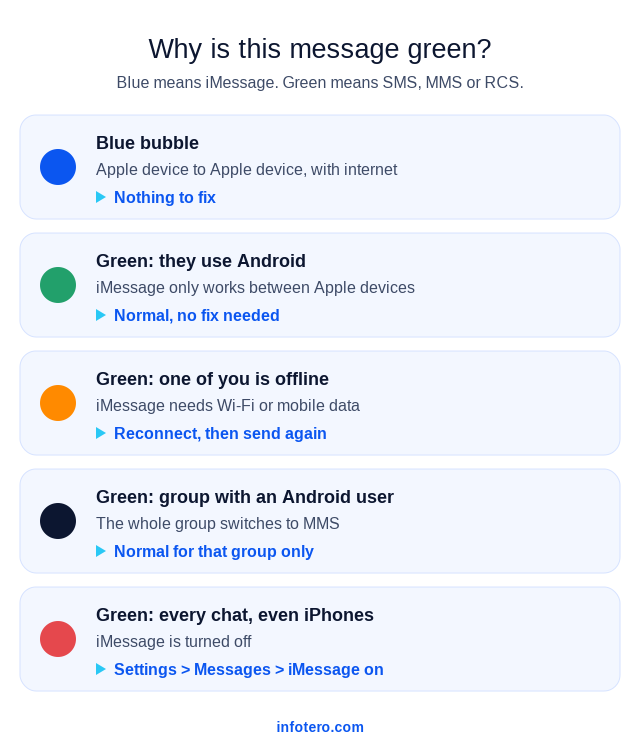
A green bubble can show up even when you’re texting a friend who has always been blue, and it often happens without warning. It isn’t a fault with your phone. Your iPhone simply picked a different way to deliver that one message, and the reason is usually easy to spot. The checklist below covers the quick fixes, and the table after it helps you work out which situation you’re in.
Quick Fix Checklist
- Check who you’re texting. iMessage only works between Apple devices. If the other person uses Android, green is normal and nothing is wrong.
- Check your connection. iMessage needs Wi-Fi or mobile data. If both are weak, your iPhone may send the message as SMS instead.
- Make sure iMessage is on. Open Settings, go to Messages (on newer iOS: Settings > Apps > Messages) and turn on iMessage.
- Ask the other person to check too. If their phone is offline or has iMessage turned off, your message to them can go green.
- Restart your iPhone if blue bubbles don’t come back with a good connection.
Find Your Problem
| Your situation | What it means |
|---|---|
| You’re texting another Apple user and you both have internet. | Messages should be blue, sent through iMessage. |
| You’re texting someone with an Android phone. | Messages are green. Your iPhone sends them as SMS, MMS or RCS automatically. |
| You’re texting an Apple user, but one of you has no internet. | The message may go as SMS in a green bubble so it still gets through. |
| You’re in a group chat with at least one non-Apple person. | The whole chat is green, because it switches to MMS so everyone can join. |
| Every message you send is green, even to iPhone friends. | iMessage is probably turned off on your phone. Turn it on in Messages settings. |
iMessage vs SMS: What Changes
| iMessage (blue) | SMS / MMS / RCS (green) | |
|---|---|---|
| Works with | Apple devices only | Any phone |
| Needs | Wi-Fi or mobile data | A cellular signal (SMS) |
| Photos and videos | Sent in good quality | Often compressed and blurry over MMS |
Your iPhone chooses between them for every message. When iMessage isn’t available, it falls back to the standard option so the message still arrives.
Why Group Chats Turn Green
A group chat uses iMessage only if every member has an Apple device. Add one person with an Android phone, and your iPhone switches that whole conversation to MMS so they can take part. This only affects that one group. Your other chats with Apple users stay blue.
What Happens If You Turn iMessage Off
If you switch iMessage off, every message you send goes as a standard text, so all your bubbles turn green, even with friends who have iPhones. You can turn it back on at any time in Messages settings, and blue bubbles return for Apple contacts.
Related reading on Infotero: Why Is My iPhone Not Ringing When Someone Calls? and Why Is My Phone On SOS? Understanding and Fixing SOS Mode.
Frequently asked questions
What's the main difference between iMessage and SMS?
iMessage is Apple's own messaging service that works only between Apple devices over the internet. SMS is the standard text service that uses your carrier's network and works on any phone.
Why do photos I send to Android users look blurry?
When you send a photo to a non-Apple phone over MMS, it gets compressed heavily, so photos and videos look lower quality.
Can I use iMessage without a cellular signal?
Yes. iMessage works over Wi-Fi alone. Standard SMS text messages need a cellular signal.
Why are messages to one iPhone friend suddenly green?
Usually their phone or yours had no internet at that moment, or they turned iMessage off or switched to a non-Apple phone. Ask them to check that iMessage is on.
Sources
Facts in this article were checked against these sources. Spotted an error? Report a correction.
- 1Why are my iPhone messages green? - Apple Supportsupport.apple.com
- 2
- 3iMessages randomly sending as SMS or RCSapple.stackexchange.com
- 4
- 5iMessage vs. SMS: What's the Difference?spectrum.com
- 6